
PlayinMatch Withdrawal Time — Request to Bank in Four Stages, With Clear UTR Tracking
PlayinMatch withdrawal time is usually two to three hours from the moment you submit a request, and the method you cash out through sets the exact pace. UPI, bank transfer and Skrill each move differently. Bonus money waits longer, because your identity gets checked before that payout is released.

PlayinMatch Withdrawal Time in Four Stages — A Clear Payout Strip
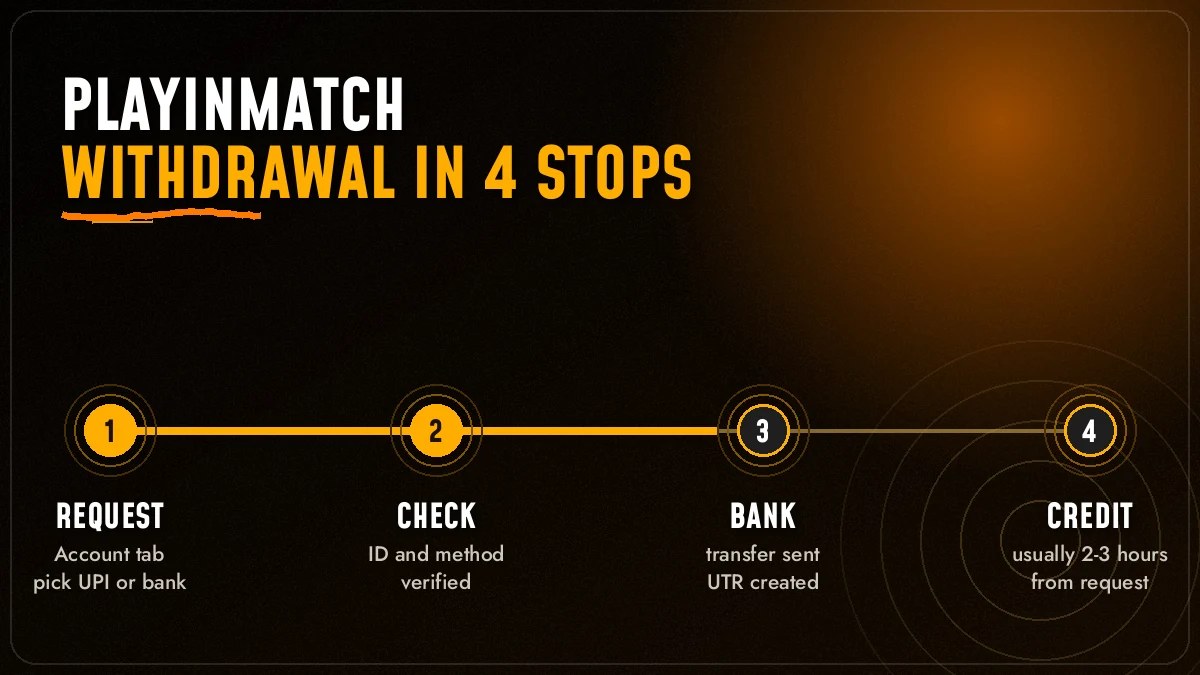
Four stops. That is the whole trip your money makes after you tap Withdraw on PlayinMatch.
- RequestAmount and method sent from the Account tab
- CheckThe desk matches the ID, balance and any bonus
- BankPayment leaves for your UPI, bank or wallet
- CreditYour bank or wallet shows the money
The two-to-three-hour figure comes from the official PlayinMatch FAQ, and it covers all four stops together, not just the first one. Most of that window sits in stage two and stage three. Stage one takes seconds. Stage four is really your bank's business, and a busy bank on a Monday morning can add a little on top of whatever PlayinMatch has already done.
You will see a slightly different promise on the lobby itself. The Join Now strip on the PlayinMatch home screen lists instant withdrawals and deposits, and an old ticker notice from 01 Sep 2021 talks about superfast withdrawals. Deposits really are close to instant (UPI top-ups usualy show straight away). For money going out, plan around the FAQ number instead. Two to three hours is the honest planning figure, and if a payout lands sooner, good.
Stage two is where PlayinMatch actually earns the wait. Someone, or something, confirms the request came from the the right ID, that the balance covers it, that no bonus is attached, and that the name on the payout details is the same name that signed up with the 6-digit OTP. Clean requests pass that in a short while. Messy ones do not, and the next few cards are mostly about keeping yours clean.
Before you tap Withdraw, run through this once:
- The UPI ID, bank account or Skrill email is in your own name, the same one on your PlayinMatch ID.
- No bonus credit is sitting in the balance, or you accept the slower lane if there is.
- Your registered mobile number is the one you still use, so the desk can match you fast.
- No older PlayinMatch request is still pending.
- You have not already made a large payout earlier the same day.
One thing that trips people up: the clock starts when the request is submitted, not when you first opened the Withdraw screen and then wandered off to watch an over of an IPL chase. If the confirmation never went through, nothing is moving yet. Check the Account tab for the entry before you start counting.
PlayinMatch Withdrawal Time by Method — Verified Payout Routes
PlayinMatch pays out through the same family of methods it takes money in with: UPI, bank transfer (Net Banking), Skrill and VISA. The official line is short. Usually 2-3 hours, and it varies by method. That is all PlayinMatch publishes, so the table below does not pretend to give each route its own stopwatch figure.
| Method on PlayinMatch | Usual window | What shapes the wait | Keep ready if it runs long |
|---|---|---|---|
| UPI | Usually 2-3 hours | The UPI ID must belong to the same person as the PlayinMatch account | UTR from the payout, registered mobile |
| Bank transfer / Net Banking | Usually 2-3 hours | Your bank's own processing after PlayinMatch sends it | UTR or transaction ID, last four digits of the account |
| Skrill | Usually 2-3 hours | Wallet-side posting once the transfer leaves | Skrill email on the account, transaction ID |
| VISA | Varies by method | Card routes depend on the card issuer | Transaction ID, registered number |
Honestly, the method matters less then people expect. What moves the needle is whether the details you entered match the name on your PlayinMatch ID. A mismatch is the single most common reason a payout sits in stage two for longer than it should, because someone has to look at it by hand.
Fastest-feeling route: UPI, mostly because the credit shows on your phone the second your bank posts it, so you notice it quickly.
Slowest-feeling route: a card or a bank that batches its incoming transfers. The money may already have left PlayinMatch; you just cannot see it yet.
A worked example makes the point better than a rule. Say a player in Jaipur asks for ₹2,000 to a UPI handle that is saved under his father's name. The PlayinMatch request is fine, the balance is fine, the payout still pauses, because the handle does not match the account holder. Same player, same amount, own UPI handle next week: it simply goes through. (Composite case, but it is the pattern the desk sees most.)
If you want to change the method you normally use, do it before you request the payout, not halfway through. Log in through the PlayinMatch com mobile login page, open Account, and check the saved details first.
Why PlayinMatch Bonus Withdrawals Take Longer — Secure Identity Check First
Bonus money is slower on purpose.
When any part of the balance you are cashing out came from a bonus, PlayinMatch runs an identity check before releasing it. The official FAQ says exactly that: bonus withdrawals take longer than the usual two to three hours, because the account holder is verified first.
The bonus most people meet first on PlayinMatch is the ₹300 referral bonus listed in the official lobby, the one you earn when a friend you invited joins. It is a small figure, and that is exactly why people are surprised when it slows a larger payout down. The check is about the account, not the amount. If the ₹300 is mixed into a ₹5,000 balance, the whole request can go through the slower lane.
Planning a same-night cash-out? Open your PlayinMatch account settings before the first bet, not after the last one. Switching bonus credits off there means nothing lands in the balance to trigger the check later, and a casino wager bonus you never wanted can be dropped from the same screen. Five seconds now, a shorter queue at the end.
A KYC page exists on PlayinMatch for this reason. Complete it once, early, while nothing is waiting on it. People who fill it in only when a bonus payout is already held tend to add their own delay on top of the check — the documents go in, the desk reviews them, and only then does stage three start.
Does that mean you should refuse bonuses? Not necessarily. It means you decide in advance. If your plan is to play a session of Cricket War or Ultimate AB and cash out the same night, a bonus attached to that balance will probably cost you time. If you are staying on PlayinMatch for the week, the check is a one-off, and once KYC is done it tends to be quicker on later requests — hard to promise exact numbers there, though.
Short version: no bonus in the balance, normal clock. Bonus in the balance, expect the PlayinMatch check first and a longer wait.
PlayinMatch Withdrawal Problem Today — Five Real Causes and Quick Checks
Five causes cover nearly every late payout people type into Google on a given day. Two of them take under a minute to rule out on PlayinMatch, so start there.
The request never submitted. The Withdraw screen was opened, the amount typed, and then the confirmation step was missed. Open the Account tab on PlayinMatch; if there is no entry, there is no withdrawal.
Name mismatch. The UPI ID or bank account belongs to a brother, a friend, a shop. PlayinMatch pays the account holder, so a mismatched payout waits for a manual look, sometimes a correction from you.
Bonus in the balance. Covered above. The identity check comes first, and that easily pushes a PlayinMatch payout past the 2-3 hour mark.
Daily limit reached. Limits may apply per day. A second large request on the same day can simply wait for the next one.
The bank has it. PlayinMatch shows the payout as sent, your statement shows nothing yet. This is the "successful but not received" case, and it has its own fix in the next card.
Notice what is missing from that list: nothing here needs a second payment, a "release fee" or a top-up to unlock a withdrawal. Nobody on the official PlayinMatch desk asks for that. If a message does, stop there.
Also, and this happens more than you would think, sometimes the address you normally open is not loading. That is not a withdrawal problem either. Betting domains get blocked in India from time to time, and when one PlayinMatch address stops opening, the same account and the same pending request are there on the next working address. Nothing about your payout resets.
PlayinMatch Withdrawal Successful but Not Received — The Secure UTR Fix
This one feels the worst, because PlayinMatch is telling you it paid and your bank is telling you it did not. Usually both are right. The money is in between.
- Find the UTR. Open the withdrawal entry on PlayinMatch and copy the UTR or transaction ID. Its the reference both sides use to trace one payment.
- Wait one bank cycle. Give your bank roughly one working cycle to post it. A payout sent late at night often shows the next morning, not in the next ten minutes.
- Check the right account. Look at the exact account or UPI handle you entered, not the one you usually use. Wrong-handle payouts are more common than lost ones.
- Send the desk three things. UTR or transaction ID, your registered mobile number, and the amount. Nothing else is needed on the first message to PlayinMatch.
- Ask your bank with the same UTR. If PlayinMatch confirms it left and a cycle has passed, your bank can trace it from the UTR.
Never send money again to "speed up" a PlayinMatch payout that shows as successful. A payout does not need a second deposit to arrive, and a second deposit does not make the first one move faster.
What should that first message look like? Something as plain as: "Withdrawal of ₹3,500 to UPI shows successful on PlayinMatch, not in my bank yet. UTR attached, registered number attached." That is it. No screenshots of your whole screen, no password, no OTP. The shorter and more exact it is, the sooner the PlayinMatch desk can tell you which stage the money is at.
The same fix covers the reverse case people search for: a deposit debited from the bank but not credited to PlayinMatch. Same three items (UTR, registered number, amount), same one-cycle wait, same desk. A full day feels like the natural point to start worrying. It is not, actually — that is too long to sit on it. One bank cycle is the right yardstick, and for most UPI payments that is far shorter than a day.
If the account itself shows as blocked while a withdrawal is pending, do not open a new one to get around it. Message the desk with your registered number and let them look at the original. A fresh ID starts with a fresh balance, and your pending payout stays on the old one.
PlayinMatch Withdrawal Problem on Telegram — Use the Official 24x7 Desk
Roughly 480 searches a month pair "playinmatch withdrawal problem" with Telegram. That tells you where people go when a payout is late: a public group, hoping someone there can push it. Nobody in a PlayinMatch group chat can open your account, so the post mostly gets you private messages.
PlayinMatch does have community channels — Telegram, Instagram, YouTube, X, Facebook — and they are fine for news, ticker notices and the occasional promo card. But the main support channel on the official app is live chat, and the ID desk behind this site answers 24x7. A withdrawal needs someone who can see your account. A public group cannot.
Post in a group: strangers read your UTR, some offer "help" in private messages, none can open your PlayinMatch account.
Message the desk: one person sees the request, the ID and the payout reference together, and can tell you which stage it is stuck at.
Anyone who replies privately in a Telegram group asking for your password, your OTP, or a "processing charge" is not PlayinMatch staff. The desk never needs the 6-digit OTP that the sign-up screen sends to your mobile. Keep that code to yourself. Keep in mind too that lookalike and mirror listings for PlayinMatch show up in Google — other app names, other package names, pages that copy the look. A withdrawal requested on one of those is not a request on your PlayinMatch ID, and the official desk cannot see it, let alone speed it up. If you are not sure which lobby you signed up on, ask the desk before you chase a payout that may never have been on PlayinMatch at all. The full list of routes, timings and what to send is on the PlayinMatch customer care number page.
PlayinMatch Withdrawal Limits and Transfers — Safe Rules Before You Confirm
Two rules. Learn them once.
Daily limits may apply to PlayinMatch withdrawals. The site does not publish one fixed number for every account, so if you are planning a large cash-out, ask the desk what your ID allows before the request goes in. Splitting one amount into two requests across two days is often smoother than having the second half queue.
The second rule is the one that costs people real money. Once a PlayinMatch transfer is sent, it cannot be reversed. That covers withdrawals to a mistyped UPI handle and it covers player to player transfers too — the feature that lets you move balance from your ID to a friend's ID. Read the recipient details twice. Then once more, slowly, if the amount is large.
Withdrawal: money leaves PlayinMatch for your own UPI, bank or Skrill, usually within 2-3 hours.
Player to player transfer: balance moves from your PlayinMatch ID to another ID inside the lobby. It never touches a bank, and it cannot be pulled back either.
Can you cancel a PlayinMatch withdrawal after tapping confirm? Treat the answer as no. If you spot a mistake within seconds, message the desk straight away with the request details; whether anything can still be done depends on how far the request has moved, and once it has left for the bank, it is final.
PlayinMatch Withdrawal Time in India — What Is Real on a Busy Match Night
For Indian accounts, PlayinMatch withdrawal time in India follows the same 2-3 hour rule as everywhere else on the site. What changes is traffic.
The busy nights follow the calendar you already know: IPL evenings, a T20 World Cup knockout, the Big Bash over the Indian winter, late Premier League and Champions League kick-offs. PlayinMatch runs cricket, soccer and tennis in-play with a live counter, and the more matches finish at once, the more payouts arrive at the desk together. If you can wait until the next morning to request, you will often beat the rush without trying.
Bank holidays matter too, though less for UPI than for a plain bank transfer. If PlayinMatch sends a payout on a day your bank is closed for batch processing, the money leaves on time and posts when the bank next runs its cycle. That is the "one bank cycle" idea from the UTR card, showing up in practice.
Mid-wait and the bookmark won't open? Don't panic about the money. A PlayinMatch payout request is tied to your account, not to the web address you typed it into, so when a blocked domain forces you onto the next working PlayinMatch address, sign in there and the Account tab still shows the same request ticking along. Ask the desk for the current address rather than trusting a search result; the is PlayinMatch safe page lists what to check.
And if you mostly use the mobile app, the payout screen is the same one; the PlayinMatch app download page covers getting the official build installed so the Account tab matches what you see here.
Live PlayinMatch Tables Still Open While a Withdrawal Clears
A payout in progress does not lock the PlayinMatch lobby. The amount you requested is on its way out, and whatever balance is left stays yours to use on the Home tab, In-Play or the casino tiles. Three of the tables people open most while they wait are below.


Teen Patti and 1 Day Teenpatti sit on the lobby tiles, Aviator comes from Spribe, and the reels live under the PlayinMatch com slots section. One small caution, and it is the only one here: a new PlayinMatch request made while an older one is still pending does not jump the queue. Let the first one land.
PlayinMatch Withdrawal Time Searches — Trusted Answers in One Ledger
PlayinMatch money and support searches
Typing a PlayinMatch withdrawal problem into Google? Start with the strip at the top of this page: request, check, bank, credit. Across those four stops the PlayinMatch withdrawal time sits near two to three hours, and a stall is mostly a bonus review or a payout name that does not match. For anything tied to your own ID, the PlayinMatch customer care number and live chat reach a person who can open the account. New to the lobby? Join PlayinMatch through the official ID desk, and read is PlayinMatch safe before the first cash-out so it goes out under your own name.
Official PlayinMatch access and app searches
| Search | Where it leads |
|---|---|
| PlayinMatch com mobile login / play in match login | Sign-in, then the Account tab where payouts start |
| PlayinMatch app download / PlayinMatch app / PlayinMatch install | The official build with the same withdrawal screen |
| PlayinMatch apk / PlayinMatch app download apk old version | Android file routes; old builds may lack the latest payout options |
| PlayinMatch live app / PlayinMatch com mobile | The mobile lobby with Exch, Sports, Home, In-Play and Account |
| PlayinMatch99 / PlayinMatch 99 | The official home address and its older Playinexch name |
Live PlayinMatch games and sports searches
Play in Match is the spaced spelling of the same brand. Play in Match online and PlayinMatch online both reach the one lobby; PlayinMatch online live sports and the PlayinMatch live score today cards cover cricket, soccer and tennis in-play. The PlayinMatch game tiles, the Play in Match casino studios, PlayinMatch com slots, PlayinMatch Aviator, Play in Match Ice Fishing and the Play in Match exchange all pay out through the same withdrawal clock.
PlayinMatch Withdrawal Time FAQ — Quick, Clear Answers
How long does PlayinMatch withdrawal take?
A PlayinMatch withdrawal usually takes two to three hours from the moment the request is submitted. The method you choose, such as UPI, bank transfer or Skrill, sets the exact pace. Bonus withdrawals take longer because an identity check comes first, and your bank may add its own posting time at the end.
Why is my PlayinMatch withdrawal not received?
Most unreceived PlayinMatch withdrawals are still with the bank. Copy the UTR or transaction ID from the payout entry, wait roughly one bank cycle, and check the exact account you entered. If it still has not arrived, send the desk the UTR, your registered mobile number and the amount. Never send money again.
What is the PlayinMatch withdrawal time in India?
Most accounts in India see a PlayinMatch withdrawal complete within two to three hours. Timing slips on nights when several IPL or India matches finish together, and a bank holiday can hold a plain bank transfer until your bank posts again. UPI tends to show first, because your phone alerts you the moment it lands.
Is there a PlayinMatch withdrawal problem today?
A delayed PlayinMatch withdrawal today usually has a simple cause: the request never submitted, a name mismatch on the UPI or bank account, a bonus identity check, a daily limit, or a bank that has not posted yet. Check the Account tab first, then message the 24x7 desk with your UTR if needed.
Why are PlayinMatch bonus withdrawals slower?
PlayinMatch bonus withdrawals are slower because the account holder is verified before any bonus money is released. Even the ₹300 referral bonus can move a whole request into that check. Completing the KYC page early and reviewing the bonus settings on your account keeps the extra wait as short as possible.
Is there a daily PlayinMatch withdrawal limit?
Yes, daily limits may apply to PlayinMatch withdrawals, and there is no single published figure for every account. Before a large cash-out, ask the desk what your ID allows. Splitting a big amount across two days is often smoother than having the second request wait in the queue until the next day.
Can I cancel a PlayinMatch withdrawal?
Treat a confirmed PlayinMatch withdrawal as final. A sent transfer cannot be reversed, and that includes player to player transfers. If you notice a mistake within seconds, message the desk at once with the request details, but always check the UPI handle, account and amount before you tap confirm.
Who do I contact for a PlayinMatch withdrawal problem?
Contact the official PlayinMatch desk through live chat or the ID desk, which answers 24x7. Send your UTR or transaction ID, registered mobile number and the amount. Public Telegram groups cannot see your account, and nobody genuine will ask for your password, your OTP or a processing fee to release a payout.
PlayinMatch Withdrawal Time — Popular Searches Answered
- playinmatch withdrawal time
- playinmatch withdrawal time in india
- playinmatch withdrawal problem today
- playinmatch withdrawal
- playinmatch withdrawal problem
- playinmatch withdrawal problem telegram
- playinmatch withdrawal kitne time me aata hai
- playinmatch withdrawal pending
- playinmatch withdrawal limit
- playinmatch paise nahi aaye