
PlayinMatch App Download APK — Latest Official File Versus Old Version Builds
The PlayinMatch app download APK worth installing is the one current Android file you get through the official PlayinMatch ID desk. Old version builds and mirror listings on sites like Uptodown carry other package names or stale addresses. Take the latest file, allow the install once, then sign in.
PlayinMatch App Download APK: Official Version Ledger at a Glance
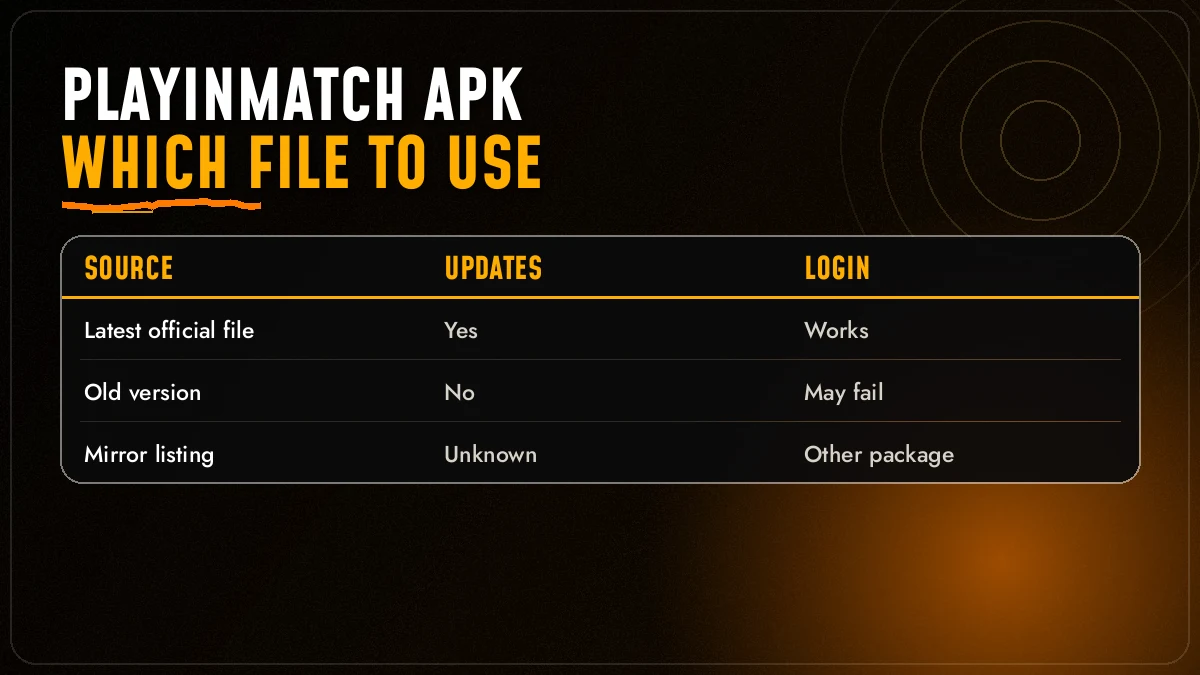
Three kinds of PlayinMatch APK float around India right now. Only one of them is the real deal.
| Check | Latest official | Old version | Mirror listing |
|---|---|---|---|
| Where the file comes from | ✓ PlayinMatch ID desk | ~ An earlier download or a forwarded link | ✗ Third-party upload |
| Gets updates when PlayinMatch changes | ✓ Yes | ✗ Frozen at its build date | ✗ Late, or never |
| Your PlayinMatch login works | ✓ Same ID and password | ~ Sometimes, until the address it calls is blocked | ✗ Cannot be confirmed |
| Package name matches the official app | ✓ Yes | ✓ If it was genuine to begin with | ✗ Often a different name |
| Shows the full current lobby | ✓ All 18 provider tiles | ✗ Newer tiles missing | ✗ Unknown |
| Desk can fix problems on it | ✓ 24x7 | ~ Only by replacing it | ✗ No |
If the PlayinMatch APK on your phone did not come from the desk, treat it as a mirror until proven otherwise. Your account lives on the PlayinMatch servers, not inside the app, so swapping the file costs you nothing. Balance, bet history and referral credit all stay put.
Why does the middle column exist at all? Mostly because people keep old files. Somebody downloaded PlayinMatch back when it still ran under the Playinexch name, forwarded the file to a cousin in Nagpur, and that same build is still doing the rounds on WhatsApp two years later. It opens. It even looks right for a few seconds. Then the login spins, or the Live Sports card shows no counters, because the build is calling an address that has since stopped working.
The right column is a different problem, and a bigger one: nobody at PlayinMatch uploaded those files.
Not sure which column your phone is in? Open the app and look for four things. A current PlayinMatch build shows the News ticker under the header, the onboarding story cards with pagination dots on entry, the Live Sports card with running counters for Cricket, Soccer and Tennis, and the full provider row from Evolution through to Winmatch Studio. Miss two of those and you are almost certainly on an old or mirrored file.
One more tell, and it is a pleasant one. Fresh PlayinMatch accounts on a current build often see the upgrade popup — “Congratulations! You have qualified for an upgrade”, confetti and card-suit gems — shortly after signing in. It is not a guarantee (it depends on the account), but that screen comes from the live PlayinMatch lobby, so seeing it in the app is a decent sign the file is talking to the right place. Mirror builds that point somewhere else won't show it at all, and old ones show whatever the lobby looked like the day they were built.
Get the Latest PlayinMatch APK From the Official ID Desk
Tap Download APK in the step card at the top of this page. That is the whole trick.
Ask for the Android file. The button opens the PlayinMatch ID desk. Say you want the PlayinMatch APK for Android; the desk answers 24x7 and normally replies within a few minutes with the current download link.
No ID yet? Ask for one in the same chat. PlayinMatch IDs are issued over chat in minutes, so you can finish the download and the sign-up in one sitting instead of two.
Open the link in Chrome. The PlayinMatch file lands in your Downloads folder. Leave it there for the install step below.
There is a reason the desk is the route and the Play Store is not. PlayinMatch is not listed on Google Play, and the file goes out as a direct download instead, which is exactly why so many copies with slightly different names turn up in search. The desk hands out the build that matches the live PlayinMatch lobby today, not the one that matched it last season.
What to say in the chat, if you want it done in one message: your phone brand, roughly which Android version it runs, and whether PlayinMatch is already installed. That last bit matters more than people expect. With an old copy on the phone, the desk will tell you to remove it first, which saves the “App not installed” loop described further down.
Add one line to that chat if it applies: “the app stopped loading last night.” More often than not that is a blocked address, not a broken phone (betting domains get blocked in India every so often), and the desk simply sends a PlayinMatch build that points at the working address. Nothing on the account moves. Same PlayinMatch ID, same balance, new file.
Prefer the browser? Open the official PlayinMatch home at playinmatch99.com on your phone and use the mobile lobby directly; the PlayinMatch com mobile page covers that route.
Want the bigger picture first? The PlayinMatch app download page explains what the app does before you fetch the APK file itself.
Install the PlayinMatch APK on Android — Clear, Quick Setup
Five taps, roughly. Android asks one extra question because the PlayinMatch file does not come from Google Play.
- Chrome finishes the download. A small bar at the foot of Chrome names the PlayinMatch file. Tap Open there; if you missed it, the Files app keeps it under Downloads.
- Android pauses you with a Settings shortcut. This is the one-time trust question for files from outside Google Play. Grant it to Chrome and nothing else, then use the back arrow to return to the PlayinMatch installer.
- The installer screen asks to confirm. Press Install. A few seconds on most phones, a little longer on older ones, and the button changes to Open.
- PlayinMatch starts with its story cards. Close them with the X and you land on the lobby, bottom menu reading Exch · Sports · Home · In-Play · Account.
- Take the Chrome permission back. Settings → Apps → Chrome → Install unknown apps → off. You grant it again the next time a PlayinMatch update arrives.
Most installs go through first time. When one does not, the error message usualy tells you which of three things happened:
The first row is the interesting one.
A word on storage, since it trips people up more than the permission prompt does. The PlayinMatch APK itself is small, but the live casino streams and game-show tiles cache images as you browse, so a phone with almost no free space can install the app fine and then struggle the first time you open a live table. Clear some room before blaming the file.
It almost always means a mirror build got there before you — two apps can't share one package name with different signatures, so Android refuses rather than mix them up. Uninstalling the stray copy fixes it; you lose nothing, since your PlayinMatch account is not stored in the the app.PlayinMatch App Download APK Old Version — The Safe Route Instead
People search for the old version for understandable reasons. Most of them, though, are chasing a fix the latest PlayinMatch file already has.
What people hope an old build does
- Run on an older, slower Android phone
- Bring back a layout they got used to
- Log in when the new file “won’t”
- Match a link a friend shared in a Telegram group
What an old PlayinMatch build tends to do
- Call an address that has since been blocked
- Loop on the login screen or show an empty lobby
- Miss newer tiles and providers
- Carry the Playinexch name from before the 21 Dec 2024 rename
That last point catches a lot of people. The official notice of 21 December 2024 moved Playinexch.com to the PlayinMatch name, and the old Playinexch247 sign-in carried over. So if the icon on your phone still says Playinexch, the file predates the rename. Your ID is fine. The file is just old.
A slow phone is rarely the file’s fault. The PlayinMatch lobby is light by design and adapts to small screens; if the latest APK stutters, the browser version on the same phone will probably behave the same, which tells you the problem is storage or network, not the build.
So what should you do instead of hunting for a file from before the rename? Three options, in the order I would try them:
- Uninstall the old PlayinMatch app and install the latest file from the desk. Two minutes, same login.
- If a newer build genuinely misbehaves on your phone, tell the desk the model and Android version. They can check whether it is a known issue.
- Skip the APK entirely and sign in through the mobile lobby in Chrome. Same PlayinMatch account, no file at all.
I said three options. There is a fourth nobody likes: leave the old build alone and hope. It works right up until the day its address gets blocked, which is usually a match day, which is usually when you least want to be reinstalling anything.
Actually, a small correction to the “slow phone” point. There is one case where the old build really is lighter: it simply has fewer tiles to draw, because half the providers were added after it was made. That is not speed. That is a smaller, out-of-date PlayinMatch lobby.
PlayinMatch APK on Uptodown and Mirror Sites — Verified File Check
Uptodown, APK download portals and the lookalike PlayinMatch listings in Google all have one thing in common. Someone other than PlayinMatch uploaded the file.
That does not automatically make every mirror copy dangerous. It does make it unverifiable, and for an app that handles UPI deposits and bank withdrawals, unverifiable is enough of a reason to walk away. These listings often use package names that differ from the official PlayinMatch app by a word or a digit, which is the same reason Android throws “App not installed” when you later try to put the real file on top.
Hard to say how many of those mirror copies are modified and how many are just stale. In practice it doesn’t matter much; you can’t tell from the outside, and the official file costs nothing and arrives in minutes. If you want the wider picture on trust, the is PlayinMatch safe page goes through it without the sales pitch.
Stop using that copy and do not send money again. Collect the UTR or transaction ID from your UPI app, add your registered mobile number, and share both with the PlayinMatch desk. Give it one bank cycle while they trace it, then move to the official PlayinMatch APK for everything after.
PlayinMatch App Download APK — Official Keyword Coverage
Latest PlayinMatch APK and Every Official Route Around It
PlayinMatch, also typed as Play in Match, PlayinMatch99 or PlayinMatch 99, runs one account across the app and the browser. A PlayinMatch app download APK request goes to the ID desk, which sends the current file; that covers the PlayinMatch apk, the PlayinMatch app itself and the PlayinMatch install on Android. Anyone searching PlayinMatch app download APK old version is better served by the latest build, because old files call blocked addresses. PlayinMatch app download without the APK means the browser route: PlayinMatch com mobile in Chrome, with PlayinMatch com mobile login or Play in Match login on the same username and password, or the PlayinMatch live app for in-play.
Once inside, PlayinMatch online and Play in Match online open the same lobby. Every PlayinMatch game sits there — Play in Match casino tables, PlayinMatch com slots, PlayinMatch Aviator from Spribe, Play in Match Ice Fishing and the rest of the game shows — beside PlayinMatch online live sports and the Play in Match exchange on the Exch tab. Cricket fans also check PlayinMatch live score today from the same app.
- To join PlayinMatch from scratch, confirm the code on the OTP Verification screen.
- Deposit by UPI, VISA, Skrill or Net Banking.
- Read PlayinMatch withdrawal time before your first cash-out: usually 2-3 hours.
- For a PlayinMatch withdrawal problem, share the UTR with the desk; the PlayinMatch customer care number and live chat answer 24x7.
| Official file | From the ID desk |
|---|---|
| Is PlayinMatch safe as an APK | Only from the official source |
| iPhone | Safari mobile lobby |
PlayinMatch APK Update and Your Secure First Login
Updating is just installing again. Get the newer PlayinMatch file from the desk, open it, tap Update — Android keeps your settings when the package matches.
First login after a fresh install looks like this. The story cards slide past (tap the X to skip them), then the header shows Sign up and Login. Existing players enter email or username plus password; there are also Login with Google and Login with Facebook options if that is how you registered. Forgot it? Tap Forgot Password, type your registered phone number or username, press Send OTP, then enter the code with a new password and hit Confirm. A “Resend in …” timer counts down if the SMS is slow.
Sign-up inside the app asks for name, email, a +91 mobile number and a password twice. The OTP Verification screen then wants the 6-digit code sent to that number. Tap Continue and the account is usable shortly after — no second visit needed.
Money works on the APK the way it does in Chrome: one PlayinMatch wallet, two doors into it. Deposits go in by UPI, VISA, Skrill or Net Banking and most show up straight away. Withdrawals on the official FAQ usually take two to three hours depending on the method (bonus withdrawals take longer since identity is checked first) — the PlayinMatch withdrawal time page has the detail. The lobby also lists a ₹300 referral bonus for bringing a friend, which is one more reason to send them the official file rather then a forwarded one.
Worth setting up in the first five minutes, before any match starts: open the Exch tab, find the bet-slip settings, and choose a Default stake plus your quick-stake chips with Edit Stakes. The same screen has Highlight when odds change, and FancyBet and Binary each have their own accept-any-price switch. MultiMarket in the side menu is the other thing new app users miss. It puts several markets on one screen, handy on a phone where switching tabs mid-over is fiddly.
If the login screen in the new APK rejects a password that works in the browser, clear the app’s storage once and try again. Still stuck? The Play in Match login story, linked at the foot of this page, covers the reset flow screen by screen.
Top PlayinMatch Games Ready Once the Latest APK Opens
Install done, lobby open. Here is what most people tap first, swipe through the strip.


Aviator is the one people ask about most, and it sits under Spribe among the 18 provider tiles alongside Evolution, Ezugi, JetX, Aviatrix and Winmatch Studio. Its crash rounds are short, so a sluggish old build shows its age fast here; another quiet reason to keep the PlayinMatch APK current. More on the game itself on the PlayinMatch Aviator page.
Card players tend to head straight for Teen Patti, Andhar Bahar and the house formats: Cricket War, Ultimate AB, 1 Day Teenpatti. Roulette comes in several flavours, Winmatch Roulette and Ultimate Roulette included. Slots have their own entry in the side menu, and the game-show row holds Bingo, Crazy Time, Monopoly Live and Ice Fishing. None of that changes between the app and the browser; its the same PlayinMatch lobby either way, just one tap closer on the home screen.
Not here for the casino at all? Plenty of PlayinMatch app users never open a card table. The Sports and In-Play tabs carry cricket from the IPL, Big Bash, PSL and CPL through to Ranji Trophy and bilateral Tests, football from the Premier League, La Liga and the Champions League, and tennis across the Grand Slams and ATP events. Prices move while the match is on, and the live stream of events runs inside the same app, which is where a current APK earns its keep. An old build that drops the connection every few overs is worse than no app. For live match pages the PlayinMatch online live sports story lists what runs in-play right now.
The Account tab, last in the bottom row, is where deposits, withdrawals and the referral code live. It looks identical in the APK and the browser. That is probably the simplest test of all: if the Account tab in your app looks different from the one in Chrome, one of them is not the real PlayinMatch.
PlayinMatch APK Questions — Quick, Official Answers
Where can I download the PlayinMatch APK?
Download the PlayinMatch APK through the official PlayinMatch ID desk. Tap Download APK on this page, ask for the Android file, and the desk sends the current link, usually within minutes. PlayinMatch is not listed on Google Play, so treat any other source as a mirror until the desk confirms it.
Is the PlayinMatch APK safe?
The PlayinMatch APK is as safe as the place it came from. The file from the official desk carries the genuine package name and opens the current PlayinMatch address, while a renamed mirror build cannot be checked the same way. Allow installs from Chrome for that one file, then switch the permission off.
How do I get the latest version of the PlayinMatch APK?
Ask the PlayinMatch ID desk for the newest Android file whenever the app stops loading, shows the old Playinexch name, or misses lobby tiles. Install it over the old copy. If Android refuses, uninstall the old app first, then sign in again with the same username and password.
Can I use an old version of the PlayinMatch APK?
You can open an old version of the PlayinMatch APK, but it may call an address that has since been blocked in India, so login can loop or tiles go missing. Replace it with the latest file from the desk. Your PlayinMatch ID, balance and history stay on the account, not in the app.
Is the PlayinMatch APK on Uptodown official?
No official PlayinMatch listing on Uptodown has been confirmed. Mirror portals host builds uploaded by people outside PlayinMatch, often under other package names, and they update late or never. If you installed one, uninstall it and get the Android file from the official PlayinMatch ID desk instead.
Does the PlayinMatch APK work on iPhone?
No, and no build ever will: iPhones cannot run Android APK files, whatever version a listing claims. PlayinMatch on iOS means the mobile lobby in Safari. Sign in there with your usual ID, tap Share, pick Add to Home Screen, and the icon behaves much like an app.
Popular PlayinMatch APK Searches in India
- playinmatch app download apk
- playinmatch apk
- play in match apk
- playinmatch apk latest version
- playinmatch app download apk old version
- playinmatch download apk
- playinmatch apk uptodown
- playinmatch app download apk for android
- playinmatch apk download kaise kare
- playinmatch aviator apk
- playinmatch apk old version ios