
PlayinMatch App Download — Official Android Build With the 5-Tab Lobby, iPhone Through Safari
PlayinMatch app download takes three moves: get the official Android file, let your browser install it, then open PlayinMatch and confirm the 6-digit OTP. There is no Play Store page to hunt for. On an iPhone you pin the PlayinMatch mobile lobby to the home screen instead, and the same ID signs in.
Tap Download app on the phone card above. The official PlayinMatch ID desk answers, hands you the current file and, if you have no ID yet, sets one up in the same chat.
PlayinMatch App Download: Three Official Screens From File to Lobby
Three screens. That is the whole PlayinMatch install, and the phone below loops through them in the same order your own handset will.
Screen one is the download. You tap the Download app button on the PlayinMatch app card at the top of this page, the official ID desk picks up, and the current Android file lands in your Downloads folder. Screen two is the install prompt, the one Android shows for any app that did not come through the the Play Store, PlayinMatch included. Screen three is the first open: the PlayinMatch emblem with its rings, a short run of story cards, and then the sign-up or login screen.
The phone card at the top has two links for a reason. Download app is for a phone that does not have PlayinMatch yet. The Login link is for a phone that already does, or for anyone who just wants to check a balance in the browser before bothering with an install at all. Both land at the same official PlayinMatch desk; neither one is a shortcut past the OTP.
How long does it take? The tapping is the quick part, in practice. What changes from phone to phone is how fast the download bar crawls on your connection and how quickly the OTP text reaches you, so a PlayinMatch install on home Wi-Fi feels a lot shorter than one on a patchy train signal.
One rule sits above all three screens. Take the file only from the official route. Google shows lookalike and mirror listings for PlayinMatch, some of them carrying apps with completely different package names, and none of those is the PlayinMatch build the desk hands out. If you want the file-level detail (version names, what the installer should say, what a wrong file looks like), the PlayinMatch APK notes go deeper than this page does.
A typical mix-up looks like this. Someone types the brand into Google, taps the first download-looking result, installs an app with a different name and then cannot find the OTP screen anywhere. The fix takes about a minute: delete that app, open the PlayinMatch app card here, and install the file the desk sends.
Official PlayinMatch Android Download, Tap by Tap
On Android, the PlayinMatch app arrives as a file, not as a store page.
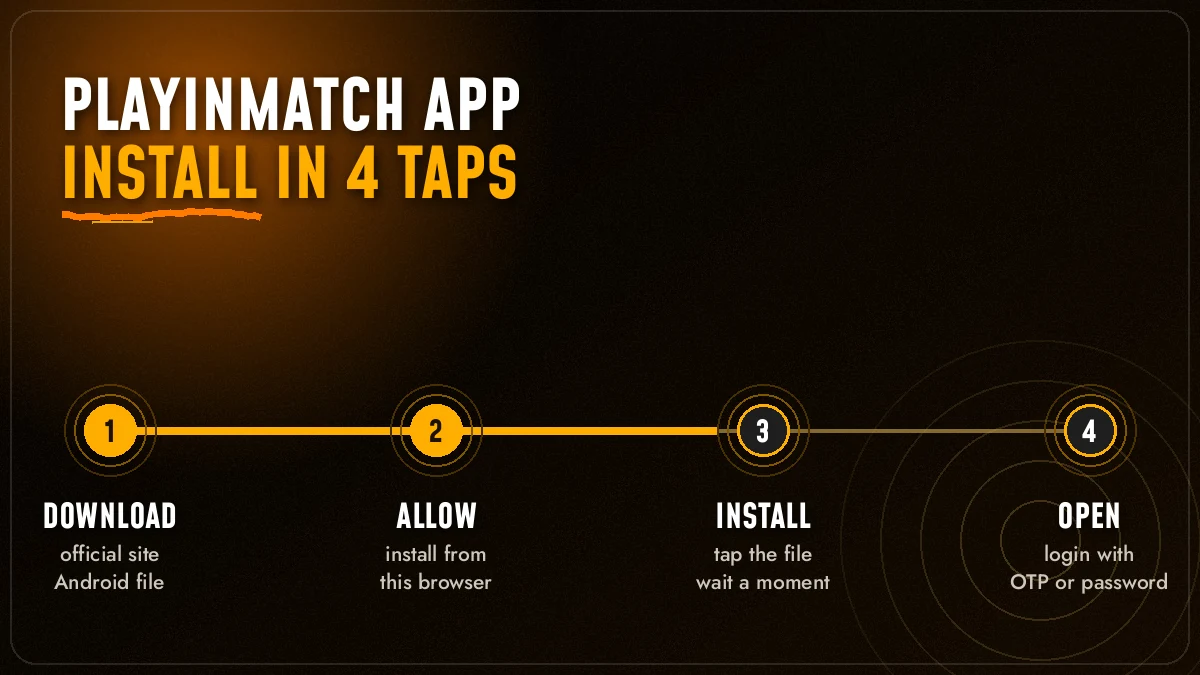
- Open this page in the browser you normally use and tap Download app on the PlayinMatch app card at the top.
- The official PlayinMatch ID desk opens in chat. Ask for the current Android file. No ID yet? The same chat issues one, usually within minutes.
- Tap the file link the desk sends. Your browser may warn that this kind of file can harm your device; it shows that line for every app from outside the Play Store, so it is not a verdict on PlayinMatch. Tap Download anyway.
- When the bar finishes, tap Open on the download notification, or find the PlayinMatch file in the Downloads folder.
- Tap Install. Wait for the Done / Open choice, and pick Open.
Which file is the right one? The one the desk gives you. PlayinMatch’s own FAQ says the same thing in its own words: search for the platform, take the most recent file and install it directly, rather than keeping an old copy around. That advice matters more then it sounds, because an old PlayinMatch file is the likeliest one to fail on a newer phone.
Comes from the link the official desk sends. Installs under the PlayinMatch name. Opens to the story cards and then the lobby with Exch, Sports, Home, In-Play and Account along the bottom.
Came from a lookalike or mirror listing. Carries another app name or package label. Opens to a screen that looks nothing like the PlayinMatch lobby, or asks for money before you have even signed in.
A download that dies halfway is usually not the file’s fault. Betting domains get blocked in India from time to time, and when one PlayinMatch address stops loading, the same account opens on the next working address. The desk will tell you which one is live today. Download from there, and the rest of the steps stay exactly as above.
What should the installer screen show? The PlayinMatch name and the PlayinMatch emblem at the top, then Install and Cancel. That is all. If the installer names a different app, or the icon belongs to something you have never heard of, press Cancel. A genuine PlayinMatch install never needs you to hand over a password or pay a fee just to get past that screen.
Keep the file after you install? You can, but there is little point. The next time PlayinMatch ships a newer build you will want that one, not the copy sitting in Downloads since last month.
Allow the PlayinMatch Install From Your Browser — a Quick, Safe Switch
Android stops outside files until you say yes. Once.
Expect a refusal on the very first tap of the PlayinMatch file. It reads roughly “not allowed to install unknown apps from this source” and carries a Settings link. Nothing is wrong with PlayinMatch here; Android is asking a narrower question, namely whether Chrome (or Samsung Internet, or whatever fetched the file) is trusted to pass apps along to the installer.
- Tap Settings on that notice.
- Switch on Allow from this source for the browser.
- Press back once. The PlayinMatch install screen returns with the Install option live.
Phone makers label this switch a little differently. On some it sits under “Install unknown apps”, on older ones it is a single “Unknown sources” toggle for the whole phone. Same idea, same outcome: the PlayinMatch installer gets permission from the one browser you picked, and nothing else changes.
Once PlayinMatch is installed you can flip that permission off again. The app keeps working. Android will simply ask again the next time you install a newer PlayinMatch file, which is a fair trade.
You may also see a Play Protect card saying it does not recognise the app. That is expected for PlayinMatch, since the build is not listed on the Play Store, so Google has no store record to compare it with. Read the card, check that the app name on it says PlayinMatch, and continue if it does. If the name on the card is something else entirely, stop there and delete the file.
Three other messages turn up now and then during a PlayinMatch install:
First Open of the PlayinMatch App — Fast 6-Digit OTP Login
First open, the PlayinMatch app shows you its story cards; after that, it wants your number.
The cards are the onboarding deck the official PlayinMatch lobby uses everywhere: stacked outlined cards, pagination dots along the top and a close X in the corner. One of them is the “Superfast Withdrawal” slide. Swipe through or close them, and you land on Sign up and Login. Which one you pick depends on whether you already hold a PlayinMatch ID.
New here and in a hurry? The PlayinMatch sign-up form also offers Sign up with Google and Sign up with Facebook, which skip typing a password on a small keyboard. The OTP step still applies to your mobile number, so the account stays tied to a phone you control. Already a member? The small “Already a member? Sign in” line under the form takes you back to the login fields without losing the app’s place.
| Your situation | What you type | What PlayinMatch sends back |
|---|---|---|
| No ID yet | Name, email, mobile (+91), password, confirm password | OTP Verification screen asks for the 6-digit code texted to that number; tap Continue |
| Already have an ID | Email or username, then password | Straight into the lobby on the Home tab |
| Forgot the password | Registered phone number or username, then Send OTP | A code; enter it with the new password and tap Confirm |
| Prefer a social account | Sign up or Login with Google or Facebook | The same PlayinMatch account, no separate password |
The code usually arrives quickly. Usually. If it doesn’t, wait a moment before you touch “Resend OTP”; hammering it three times in a row only leaves you guessing which of three codes is the current one. The forgot-password screen has a “Resend in …” timer for the same reason.
Old habit, new name. If your saved login still says Playinexch247, keep using it: PlayinMatch took over the Playinexch.com name with a 21 Dec 2024 notice, and those credentials carry straight into this app.
After the first sign-in, a “Congratulations! You have qualified for an upgrade” popup with confetti may appear. That is PlayinMatch opening the full lobby for a new ID: exchange, sportsbook and live casino together. Close it and you are on Home. For everything about the login screen itself, including what to do when an account is blocked, the Play in Match login page covers it field by field.
From here on, the PlayinMatch app remembers you. You will not see the OTP again unless you log out, reset the password or install on a new phone.
PlayinMatch on iPhone — the Easy, Official Home-Screen Route
There is no iPhone file to install. You pin the PlayinMatch lobby instead.
The reason is simple. PlayinMatch is handed out as an Android file, and iPhones do not run Android files at all, so anything claiming to be a PlayinMatch download for iOS is worth ignoring. What an iPhone can do is keep the official PlayinMatch mobile lobby one tap away, with its own icon next to your other apps.
Safari first, not Chrome for iOS. Load the official PlayinMatch mobile lobby there; if the usual address refuses to open, the desk has the working one for today.
Pin it with Add to Home Screen from Safari’s share sheet. The label box sometimes fills with a long web address, so type PlayinMatch there; a short name is what makes the icon easy to spot on a crowded screen.
From now on, your PlayinMatch icon is the app. Tap it, sign in once (password, or the OTP if the account is new), and the five-tab lobby is there.
Same ID, same balance. Nothing about a PlayinMatch account lives on the phone, so an Android user who switches to an iPhone just signs in on the new icon and carries on. Deposits, open bets and withdrawal requests all sit on the account.
There is one quiet advantage to the iPhone route. Because the icon loads the live PlayinMatch lobby every time, there is never a file to update; whatever PlayinMatch changes on the mobile lobby shows up on your home screen the next time you tap it. Android users fetch a new file now and then. iPhone users do nothing.
One thing the iPhone icon cannot do is follow PlayinMatch to a new address on its own (a small catch, honestly). When the address it was saved from gets blocked, remove the icon and pin the working one. Thirty seconds, roughly.
Want to understand what the browser version looks like before you pin it? The PlayinMatch com mobile page walks through the mobile lobby paths, which is exactly what your iPhone icon opens.
Inside the Official PlayinMatch App — Where Exch, Home and Account Sit
Exch, Sports, Home, In-Play, Account: that row is the whole PlayinMatch map, and most people spend their time on two of the five.
The Home tab is the busy one. Behind those tiles PlayinMatch lists 18 providers, among them Evolution, Ezugi, Spribe, Playtech, BetGames, TVBET and Winmatch Studio, so the same app that shows a Test match on Exch also runs Aviator, Crazy Time and a live roulette studio. The Play in Match game page lists those titles one by one.
The Live-Casino shortcut opens the card rooms: Blackjack, Poker, Roulette and Baccarat, plus Teenpatti, Andhar Bahar, game shows and lightning formats. PlayinMatch describes around 50 or more varieties in each family, which on a phone screen means a lot of scrolling. What helps, in practice, is learning which two or three tiles you actually like and ignoring the rest.
A side menu adds five shortcuts: Exchange - InPlay, Sportsbook - InPlay, MultiMarket, Live-Casino and Slots. MultiMarket is the one people miss (several markets on one screen, which is handy when an IPL chase and a Premier League match overlap). Settings on the Account tab let you set a default stake and ask PlayinMatch to highlight odds when they change.
In-Play is where the PlayinMatch app earns its space on your phone. The Live Sports card counts how many cricket, soccer and tennis events are running right now, and prices move while the match does. On the Exch tab, an unmatched bet can be kept “At In-Play” instead of being cancelled, and the slip has its own keypad and quick-stake chips you can change under Edit Stakes. Doing that on a phone with the app already open is simply faster then typing an address mid-over.
The Account tab is where an app earns trust, so here are the official PlayinMatch numbers. UPI, VISA, Skrill and Net Banking for deposits, which usually appear at once. About two to three hours for a withdrawal, per PlayinMatch’s own FAQ, with the method making the difference. The PlayinMatch withdrawal time page splits that by method and covers late payouts.
The Account tab is also where the ₹300 referral bonus from the official lobby shows up, alongside player-to-player transfer. Check the receiving ID twice before you send a transfer; once it goes, it cannot be pulled back.
Short version: the PlayinMatch app and the PlayinMatch mobile lobby are the same lobby. The app just keeps it one tap away and keeps you signed in.
Update or Reinstall the PlayinMatch App — Quick, Clean Fixes
When the PlayinMatch app starts acting odd, fetch the newest file. That fixes most of it.
Updating PlayinMatch is not a separate skill. You repeat screens one and two from the phone frame above, and Android lays the new build over the old one while the icon stays where it was. The single hiccup is “App not installed”, which means the two builds disagree; remove PlayinMatch, then tap the new file again.
Does uninstalling wipe anything? No. Your PlayinMatch ID, balance, open bets and history sit on the account. Uninstalling only removes the app from the phone, so after a reinstall you sign in, and everything is where you left it. I said “sign in” — strictly, a fresh install means the OTP step returns too, so keep the registered phone near you.
Plenty of people search for an old PlayinMatch version, usually because a newer one crashed once. It is tempting. It is also the wrong direction. An old file is exactly the one most likely to break on a recent Android update, and it may miss changes the lobby has made since. Take the current file; if that still misbehaves, tell the desk the phone model and what the screen says.
Money trouble is a different fix, and it is not the app’s job. If a deposit left your bank but did not reach the PlayinMatch balance, or a withdrawal shows successful but has not arrived, send the UTR or transaction ID and your registered number to the desk, then wait one bank cycle. Do not send the same amount again to “push” the first one through; that only gives PlayinMatch two payments to trace instead of one.
Back in business: after a reinstall, the PlayinMatch story cards play once more, you close them, sign in, and the Home tab opens with your balance on the Account tab exactly as it was.
If the app installs fine but the lobby will not load, look at the address before you blame the phone. A blocked domain looks exactly like a broken app from the inside, and its easy to reinstall three times for nothing. The desk knows which PlayinMatch address is working, and the live chat inside the app is the quickest way to ask. For the always-on side of the app, the PlayinMatch live app page covers in-play screens and streams.





PlayinMatch App Download Questions — Clear, Quick Answers
How do I download the PlayinMatch app?
It depends on the phone. Android users get the current PlayinMatch file from the official ID desk through the Download app link, give the browser install permission, and install. iPhone users skip the file and pin the PlayinMatch mobile lobby from Safari. Either way, the same ID and OTP sign-in apply.
Is the PlayinMatch app available on Play Store?
No, and that is by design rather than a missing listing. The official PlayinMatch Android build travels as a file from the ID desk. So a store page, or a mirror site offering an app under another name, is not where the real one lives. Check the installer says PlayinMatch before tapping Install.
Can I install PlayinMatch on iPhone?
Not as a file, because iPhones cannot run the Android build. Open the official PlayinMatch mobile lobby in Safari, tap Share, then Add to Home Screen. The new icon opens the same lobby with all five tabs, and your existing PlayinMatch ID and balance work there unchanged.
Is the PlayinMatch app download free?
Yes. There is no charge for the PlayinMatch file, and the ID desk issues new IDs free over chat. Money only enters the picture when you decide to deposit from the Account tab by UPI, VISA, Skrill or Net Banking. A listing that wants a fee before it sends a PlayinMatch file is a lookalike.
Why is PlayinMatch app not installing?
Most often the browser lacks permission to install apps, an older PlayinMatch build conflicts with the new one, or the download was cut short. Allow installs from that browser, uninstall the old version, and fetch the file again. If the address will not load, it may be blocked, so ask the desk.
Top PlayinMatch App Searches Right Now
- playinmatch app download
- playinmatch app
- playinmatch install
- playinmatch download
- playinmatch app for android
- play in match app
- playinmatch app download kaise kare
- playinmatch app iphone
- playinmatch app install nahi ho raha
Official PlayinMatch App Download Index
Trusted PlayinMatch App Download and Install
Searches for PlayinMatch app download, the PlayinMatch apk and even a playinmatch app download apk old version all end at one current file from the official desk. After the PlayinMatch install, the PlayinMatch app mirrors what browsers show as PlayinMatch online or Play in Match online; nothing extra is hidden inside.
On iPhone there is nothing to install; you pin playinmatch com mobile to the home screen and use playinmatch com mobile login or the Play in Match login with your OTP. The brand still shows up in searches as PlayinMatch99 and PlayinMatch 99, and the official home is playinmatch99.com. If you want to join PlayinMatch fresh, the desk issues an ID in minutes over chat.
Best PlayinMatch App Features After Install
Once installed, the PlayinMatch app is a full PlayinMatch live app. People ask is PlayinMatch safe before installing; the short answer is to use only the official file and the desk. Here is what the tabs hold:
- PlayinMatch online live sports and the Play in Match exchange on Exch, Sports and In-Play, where the PlayinMatch live score today sits beside the markets.
- Every PlayinMatch game on Home: the Play in Match casino tables, PlayinMatch Aviator, Play in Match Ice Fishing and PlayinMatch com slots.
- Three searches, one door: PlayinMatch customer care number, PlayinMatch withdrawal problem and PlayinMatch withdrawal time all lead to the live chat inside the app, where a UTR gets a stuck payout traced.